
Free Grow a Garden Tools
Last verified: August 10, 2026
Values checked against in-game testing and community sources. Spot an error? Report it here.
🌱 Grow a Garden Calculator
Use this tool to calculate plant value and other game utilities.
✨ Growth
🌡 Temperature
🌍 Environment
Calculated Plant Value (Sheckles)
⚠️ Plant calculations provide a minimum estimated value. Pet formulas are inferred and may require user adjustment.
Looking for a Grow a Garden calculator that matches what the sell menu actually pays? You are on the right page. The free tool above prices any GAG1 crop in Sheckles using weight, growth variants, stacked environmental mutations, friend boost, and quantity — the same levers traders and farmers argue about every restock. Last verified September 18, 2026. Playing the sequel instead? Use the Grow a Garden 2 calculator (mutations do not stack the same way).
Aug 2026 live: GAG1 Harvest Moon (Moonbeam → Moon Coins). GAG2 Fall Harvest world (Leaves, Magic Mail). See current events. Moonbeam Sheckle chip pending confirmed multiplier — use event stand for Moon Coins. GAG2 chips updated: Veil ×50, Amber ×20 on the GAG2 calculator.
Live now (October 9, 2026)
This free Grow a Garden calculator / gag calculator (also searched as kalkulator gag and kalkulator grow a garden) prices GAG1 crop Sheckles with weight squared and additive mutations. Need kg and age for pets? Use the pet tool – not the crop form. Last checked October 9, 2026.
- Breakout: Scarecrow Grow a Garden – Shady Scarecrow odds and Divine pet
- Fall Market Fall Finale – Maple Melt, Rosy Root, Collection 80%
- Pet calculator / kg and age: pet weight calculator
- Cake recipes trending: how to make cake
- GAG2: Venus Fly Trap · GAG2 codes · GAG2 calculator
- Mutation stacks: mutation calculator · Trades: trade calculator
Kalkulator gag and pet kg / age searches
If you searched kalkulator gag, kalkulator grow a garden, gag calculator, or calculator gag, you are on the right crop value page for original Grow a Garden.
| Looking for | Open this |
|---|---|
| Kalkulator gag / grow a garden calculator | This crop tool (GAG1) |
| Grow a garden calculator kg and age | Pet weight calculator |
| Pet calculator / gag pet calculator | Pet weight calculator |
| Scarecrow grow a garden | Scarecrow guide |
| Code grow a garden 2 | GAG2 codes |
Crop coverage vs other Grow a Garden calculators
Some newer calculator sites show huge plant grids but use simplified math (plain weight multiply, or every mutation multiplied together). This page keeps the sell-menu formula and covers new seeds as soon as bases are verified.
| Need | What to do here |
|---|---|
| Listed Seed Shop / event crop | Pick it in the tool above |
| Maple Melt / Rosy Root (Fall Finale) | Custom base from the in-game tooltip |
| Rafflesia / Summer merchant flower | Rafflesia guide + calculator |
| Mutation stack design | Mutation calculator |
| Quoted Sheckle target → kg | Value to weight |
| Pet kg / age / age 500 | Pet weight calculator |
Fall Finale loop and shop tables: Fall Market 2026. What is live this week: current events.
What this Grow a Garden calculator does
This free Roblox Grow a Garden calculator is for the original game (GAG1). Enter crop weight, growth variant (Silver / Gold / Rainbow), environmental mutations, quantity, and friend boost to get Sheckle sell value. Players also call it the gag calculator, gag1 calculator, or a crop value, price, fruit, or sell calculator. Last checked October 2, 2026.
- Use the tool above for crop, plant, and fruit Sheckle value
- For pet kg, age, size, or age 500 projections, open the pet weight calculator
- For ability timers, open the pet cooldown calculator
- For mutation stack planning, open the mutation calculator
- For Win / Fair / Loss on an offer, open the trade calculator
- If you know target Sheckles and need kg, open the value to weight calculator
- For Grow a Garden 2, open the GAG2 calculator – different rules from GAG1
GAG calculator, GAG1 calculator, value and price tools
Whether you found this page as gag calc, calculator gag 1, kalkulator gag 1, calculadora grow a garden, grow a garden worth calculator, or crop value calculator, you are in the right place for fruit math. Value, price, worth, and sell-value wording all use the same Sheckle formula.
| Looking for | Open this |
|---|---|
| Grow a Garden calculator / GAG1 calculator | This crop tool (GAG1) |
| Value, price, worth, fruit, or plant calculator | This crop tool |
| Mutation stack math | Mutation calculator (or use the chips above) |
| Pet kg, weight, or age | Pet weight calculator |
| Trade / WFL check | Trade calculator |
| Grow a Garden 2 calculator | GAG2 calculator |
How the Sheckle formula works
Crop value scales with weight squared, then one growth variant, then an additive environmental mutation stack (mutations do not multiply each other), then friend boost and quantity.
- Weight: (weight / base weight) squared – heavier fruit raises value fast
- Growth: pick one of Default / Silver / Gold / Rainbow
- Environment: stack Wet, Shocked, Celestial, and similar additively in the bracket
- Friend boost: nearby friends add a sell percentage (cap can change – check in-game)
- Quantity: multiplies the per-fruit result when you sell a matching stack
That is why two screenshots of the same crop can disagree: different kg, growth, or mutation stacks. Re-enter the live tooltip here before you sell or check a trade.
Need a pet calculator instead?
Pet weight, kg, age, size, ability, and age 500 questions belong on the pet tools – not the crop form above:
| What you need | Tool |
|---|---|
| Pet kg and size class | Pet weight calculator |
| Age 500 / weight projection | Pet weight calculator |
| XP to a target age | Pet XP calculator |
| Ability cooldown timing | Pet cooldown calculator |
| Pet mutation reference | Pet mutations guide |
| Pet trade values | Pet value list and the trade calculator |
| Egg hatch hours | Egg hatch calculator |
| Ability text | Pet abilities guide |
Profit, mutations, trades, and related tools
If you also need profit, mutation planning, or fair trades alongside plant values, use the matching tool:
| Goal | Best tool |
|---|---|
| Single fruit Sheckle value now | This GAG1 calculator |
| Design a mutation stack | Mutation calculator |
| Sheckles per hour | Profit calculator |
| Fair trade / WFL | Trade calculator |
| Seed cost before planting | Seed price list |
| Gear sticker values | Gear values |
| Grow a Garden 2 economy | GAG2 calculator |
There is no separate pedigree breeding calculator in Grow a Garden. When players say “breeding combinations,” they usually mean crop choice plus mutation planning – stay on this page and use the mutation calculator for stacks.
GAG1 vs GAG2
This page is GAG1 only – the original Grow a Garden on Roblox. Grow a Garden 2 uses different sell rules, so open the GAG2 calculator for the sequel. Progress does not transfer between games. For weekly context, see current events.
Beanstalk Event 2026 crops (archive data in picker)
As of September 18, 2026, the plant picker includes a Beanstalk Event 2026 category with floor base Sheckles (same convention as Seed Shop rows) for Aurum Spire, Brambleberry, Nebula Barb, Everglow Helix, Harpvine, Fableflower, and Twist Berry. Event guide: Beanstalk Part 3.
- Custom / Manual category: paste any base Sheckles from the in-game tooltip at 1× base weight (use for Elder Beanstalk or brand-new patches).
- Weight field is still × base weight (squared). Leave at 1 for a natural-size fruit.
- Wrong base? Report it and we will correct the row.
What this Grow a Garden calculator (GAG1) does
This free Grow a Garden calculator (also searched as GAG calculator and GAG1 calculator) is the original-game crop value / price calculator: enter weight and mutations for exact Sheckles. Need a pet calculator? Use the pet weight tool linked below — not the crop form. On Grow a Garden 2? Switch to the GAG2 calculator. Updated September 22, 2026.
The game itself is the official Grow a Garden page on Roblox. Our calculator does not require a login, download, or Roblox account. It runs in the browser so you can price a harvest on your phone mid-trade. For the wider strategy library, start at the Grow a Garden guides hub after you learn the formula below.
How to use this Grow a Garden calculator (step by step)
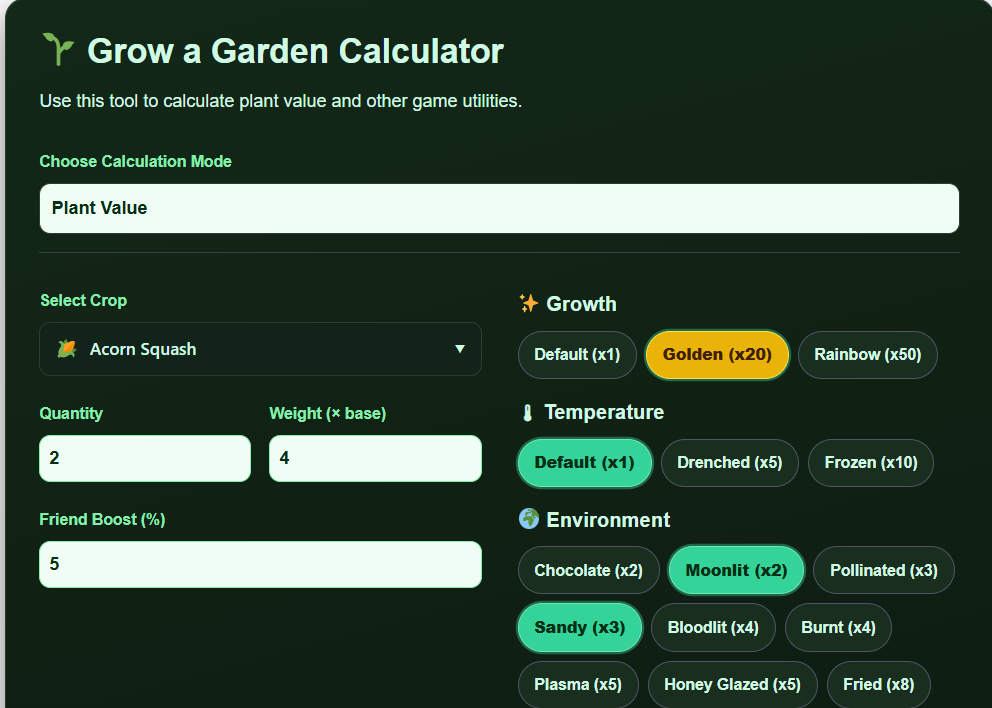
The tool at the top of this page has two modes: Plant Value and Pet Stats. Most searches for “grow a garden calculator” want Plant Value. Use Pet Stats when you need XP-to-level, hatch speed, or weight progression — or jump to the dedicated pet weight calculator for a fuller pet workflow.
1. Choose crop category and crop
Pick the category that matches your seed shop row, then select the exact crop name. Base price and base weight are crop-specific. A Carrot and a Bone Blossom are not interchangeable — wrong crop selection is the #1 source of “the calculator is wrong” reports. If you are deciding what to plant next rather than pricing what you hold, compare options in the best crops in Grow a Garden guide or the crop planner.
2. Enter weight in kilograms
Type the weight exactly as the fruit tooltip shows (decimals allowed). Value scales with (your weight ÷ that crop’s base weight)². Doubling weight does not double payout — it quadruples the weight portion of the formula. That is why sprinklers and patience beat random mutation gambling on light fruit. Deep dive: Grow a Garden sprinklers guide.
3. Set quantity and friend boost
Quantity multiplies the final line when you are pricing a stack of identical fruit. Friend boost is the sell bonus from friends in your server (commonly +10% per friend, often capped around +50%). Match the slider to your actual server before you compare a calculator number to a trade offer made in a different server.
4. Pick one growth mutation
Growth variants are mutually exclusive: Default (×1), Golden (×20), or Rainbow (×50). You cannot stack Golden and Rainbow on the same fruit. Rainbow is the jackpot variant; Golden is still a massive multiplier over Default. If you only remember one rule from this Grow a Garden calculator guide, remember: one growth slot, then everything else is environmental.
5. Pick temperature and stack environmental mutations
Temperature options (Wet, Chilled, Frozen, Drenched, and similar) occupy a constrained slot — you generally keep one temperature-style effect, not all of them. Environmental mutations (Chocolate, Shocked, Celestial, Voidtouched, Dawnbound, and the rest of the chip list) stack additively inside a bracket, not by multiplying each other like many viral TikTok formulas claim. Tap every mutation currently on the fruit; for triggers and event timing see the mutations list and weather events guide. Prefer a dedicated stacking workspace? Open the mutation calculator.
6. Read the Sheckle result and act on it
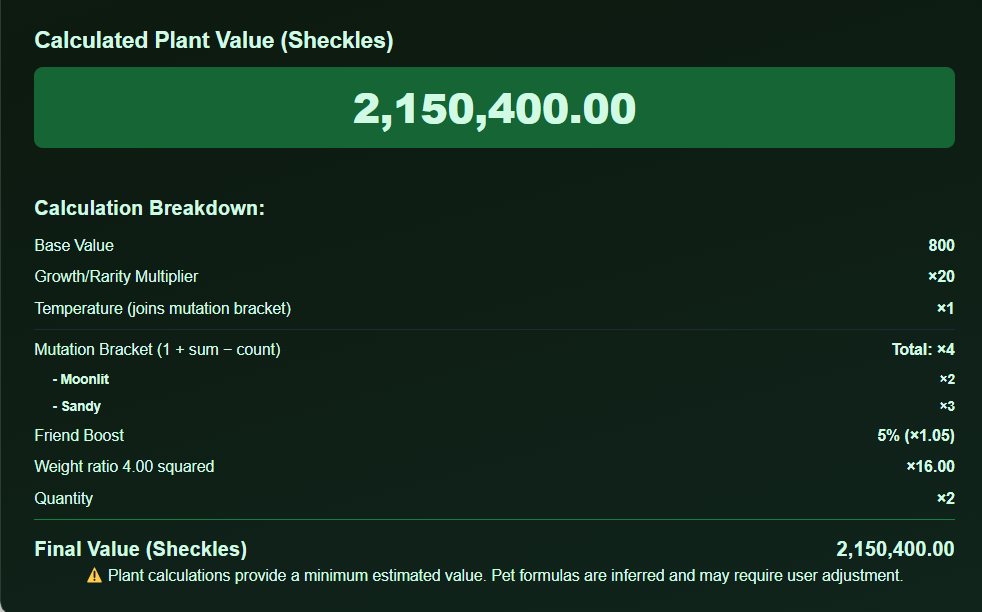
The result box is an estimated plant value in Sheckles. Use it to decide sell vs hold, whether a trade is fair, or whether a crop is worth cooking. For offer math, pass both sides through the trade calculator or read WFL (Win / Fair / Lose). For long-session income, switch to the profit calculator instead of staring at a single fruit’s peak price.
The exact Grow a Garden value formula (wiki-verified)
Quick answer: Total Price ≈ Base Price × (Weight ÷ Base Weight)² × Growth Mutation × (1 + Σ Environmental Multipliers − Number of Environmental Mutations) × Friend Boost × Quantity.
That bracket — 1 + sum − count — is the piece bad calculators skip. Environmental mutations add their multipliers together, subtract how many you applied, then add 1. Growth (Golden/Rainbow) multiplies the whole bracket. Multiplicative shorthand (Shocked × Celestial as 100 × 120) is useful for ranking stacks on Discord, but it will not match the sell screen. When this Grow a Garden calculator and a friend’s spreadsheet disagree, trust the bracket form.
| Piece | What it does | Player tip |
|---|---|---|
| Base price | Crop’s intrinsic sell constant | Wrong crop = wrong everything |
| (Weight / Base Weight)² | Quadratic mass scaling | Heavy fruit first, fancy mutations second |
| Growth mutation | ×1 / ×20 / ×50, one only | Rainbow beats almost any small stack alone |
| Env bracket | 1 + Σmult − count | More mutations help, but not as ××× folklore |
| Friend boost | Server sell bonus | Price trades in the same boost context |
| Quantity | Stack multiplier | Use for bulk, not mixed fruit |
Worked example
Take a Watermelon with base around 2,905 Sheckles at twice its base weight, Gold (×20), carrying Wet (+2) and Shocked (+100), sold with a full friend boost (×1.5): 2,905 × 2² × 20 × (1 + 102 − 2) × 1.5 ≈ 35.2 million Sheckles. A pure multiplicative reading of the same stickers lands near ~70 million — almost double what the game pays. Always reconcile with the bracket before you accept a “fair” trade.
Formula and weight scaling cross-checked against community wiki mechanics and in-game sell tests — August 1, 2026. Spot a patch change? Report it.
Why weight matters more than most mutation screenshots
Because weight is squared, moving from 5 kg to 10 kg (relative to the same base) is a 4× swing on the mass term before any Rainbow or Shocked sticker applies. A plain heavy crop can out-earn a light crop with a mid mutation list. That is why endgame players obsess over sprinkler coverage, multi-harvest plants, and not cutting fruit early for a screenshot. Use this Grow a Garden calculator to compare “harvest now” vs “wait for another weight tick” with the same mutation set locked in.
Practical loop: plant dense → keep sprinklers overlapping → watch weather for mutation windows → price with this calculator → sell on a friend-boosted server or trade with WFL backup. Restock timing for seeds and gear lives on the restock timer.
Growth variants vs environmental mutations
Think in two layers. Layer one is the growth variant slot (Default / Gold / Rainbow). Layer two is everything environmental and temperature-related that feeds the additive bracket. Viral posts that say “just multiply every badge” inflate values and cause bad trades. Our Plant Value mode mirrors the two-layer model: one growth chip, temperature choice, then as many environmental chips as the fruit actually has.
- Gold ≈ ×20 and Rainbow ≈ ×50 — mutually exclusive.
- Shocked (+100), Celestial (+120), Voidtouched (+135), Dawnbound (+150) are high-impact environmental names you’ll see in serious stacks.
- Low multipliers still matter in the sum — they are not “useless” once you understand the bracket.
- Full names, triggers, and conflicts: mutations list.
- Event timing: weather events.
Friend boost, quantity, cooking, and codes
Friend boost changes the final sell line, not the fruit’s mutation list. If you price in a solo server and trade in a full boost server, your “fair” number drifts. Quantity is for identical stacks only — mixed inventories need multiple calculator runs or the trade tool. Before you dump a rare ingredient into a pot, price it here; some dishes pay less than the raw mutated crop. Recipe index: Grow a Garden cooking recipes.
Need free seed packs or cans after a wipe? Check live Grow a Garden codes. New to the loop entirely? The beginners guide and how to get Sheckles fast pages map the early economy so this calculator is not your only decision engine.
All Grow a Garden calculators (pick the right tool)
This Grow a Garden calculator is the crop-value hub. Use sister pages when the question is not “what does this fruit sell for?”
| Tool | Use it when… |
|---|---|
| Mutation calculator | You’re designing stacks and want a mutation-first workspace |
| Profit calculator | You care about Sheckles per hour, not a single fruit’s peak |
| Trade calculator | You need Win / Fair / Lose on a full offer |
| Pet weight calculator | XP, hatch time, or pet weight progression |
| Egg hatch calculator | Egg timers with helper pets |
| Restock timer | Seed / gear shop countdown planning |
| Crop planner | Session planning for which crops to prioritize |
| GAG2 calculator | You’re on Grow a Garden 2 (different mutation rules) |
Pet market context: pet value list. Trading etiquette and scam patterns: how to trade in Grow a Garden.
GAG1 vs GAG2 calculator (this page is GAG1)
GAG1 (this page) allows rich environmental stacking inside the additive bracket plus Gold/Rainbow variants. Grow a Garden 2 uses a different sell curve (community-tested weight exponent near 2.65), generally one mutation at a time, size luck from sprinklers, freshness, and friend rules that do not copy-paste from GAG1. If your screenshots say Grow a Garden 2, do not use this page’s chips — open the GAG2 calculator. Context: GAG2 vs GAG1 and GAG2 beginners guide.
Trading smarter with calculated values
A calculator does not replace judgment — it replaces arithmetic errors. Screenshot your inputs, confirm mutations match the fruit tooltip, and remember that demand can sit above or below pure sell value for flex pets, limited eggs, and event crops. Use sell value as a floor for food crops and as one input for collectible trades. When both sides are plants, run each fruit through this Grow a Garden calculator, sum them, then sanity-check with the trade calculator.
- Never accept “trust me it’s Rainbow” without checking the growth slot.
- Re-price after any weather mutation lands or falls off.
- Separate friend-boost assumptions in the chat before you call something Fair.
- For pets, sell-value math is secondary to ability meta and weight class — use the pet tools.
Common Grow a Garden calculator mistakes
Most “wrong number” reports are input errors, not formula bugs. Walk this checklist before you rage-trade:
- Wrong crop selected — base price and base weight both change.
- Weight typed as display size or “class” instead of the kg tooltip.
- Golden and Rainbow both selected in someone’s head — only one applies.
- Environmental mutations multiplied together instead of summed in the bracket.
- Friend boost left at 0% while pricing a five-friend sell, or the reverse.
- Using this GAG1 tool on Grow a Garden 2 fruit (switch to the GAG2 calculator).
- Comparing calculator sell value to a pet/limited offer that trades on demand, not NPC sell price.
Second worked mini-example: a fruit at base weight (ratio 1 → mass term 1), Rainbow (×50), with Shocked (+100) and Celestial (+120) only: mutation bracket = 1 + 220 − 2 = 219, times 50 = ×10,950 on base price before friend boost. If a trader quotes ×12,000 because they did 100 × 120, they are using shorthand — not the sell menu. Ask them which model they want to trade on, then recalculate here.
Admin-only or retired mutations sometimes linger on community lists. If a chip exists in the tool but you cannot obtain it in the live season, treat it as theoretical max, not a farm plan. Cross-check obtainability in the mutations list and current weather write-ups.
Mobile trades and mid-session use
The Grow a Garden calculator is built for quick phone use during a trade window: keep the page pinned, switch to Plant Value, and update weight/mutations as the offer changes. Landscape mode helps when you are reading a long environmental chip list. If a dropdown looks empty, scroll the crop list or re-pick the category — the database is large and category filters matter. After you close a trade, jump to the profit calculator only if you are replanning the hour; do not force per-hour math into a one-fruit negotiation.
Farming habits that make the calculator happier
Price is the last step. Upstream: plant crops that fit your capital (best crops), keep growth hardware online (sprinklers), show up for weather (events), and don’t waste high brackets on tiny mass. After you sell, recycle Sheckles into better seeds and eggs — track hatch investment with the egg hatch calculator.
Weekly rhythm many players use: restock alerts via the restock timer → plant → weather watch → price here → sell or trade → reinvest. Codes and temporary packs: codes list.
Frequently asked questions
Is this Grow a Garden calculator free?
Yes. No account, no download, no payment wall. Use it as often as you need on desktop or mobile.
Does the calculator use Weight²?
Yes. More precisely it uses (Weight ÷ Base Weight)² against each crop’s base price, then applies growth and the environmental bracket. That is the wiki-aligned model our Plant Value mode follows.
Do mutations multiply each other?
Growth variants multiply the total. Environmental mutations sum into (1 + Σ − count). They do not each multiply the previous mutation like a chain of ×××. Details: mutations list and the mutation calculator.
Why doesn’t my number match a YouTube thumbnail?
Most thumbnails use multiplicative shorthand or outdated multipliers. Compare against the in-game sell prompt with the same weight and mutation set. If the game and this page disagree after a patch, tell us on the contact page.
Can I calculate pets here?
Yes — switch to Pet Stats mode, or use the dedicated pet weight calculator for XP, hatch, and weight progression workflows.
What about Grow a Garden 2?
Different rules. Use the Grow a Garden 2 calculator and read GAG2 vs GAG1 so you do not apply GAG1 stacks to GAG2 fruit.
How do I check if a trade is fair?
Price plant sides here, then confirm with the trade calculator / WFL guide. Factor friend boost and whether the other side is a pet with demand premium.
Does friend boost change mutation math?
No. It scales the final sell value after weight, growth, and environmental brackets are applied.
Calculator search aliases
Searches for fruit calculator, profit calculator, multiplier calculator, roblox grow a garden calculator, and crop value math use this crop calculator. Pet kg / age style searches belong on the pet weight calculator. Mutation stacks: mutation calculator. Verified September 23, 2026.
Grow a Garden calculator FAQ
Quick answers about this calculator: GAG1 vs GAG, value and price wording, pets, mutations, trades, profit, and Grow a Garden 2.
Is this the free Grow a Garden calculator / GAG calculator?
Yes. It is a free browser GAG1 crop value tool on growsagardencalculator.com – no download. It works on mobile in the Philippines, Indonesia, the US, and elsewhere.
Is GAG1 calculator the same as GAG calculator?
Yes. GAG, GAG1, gag calc, and Grow a Garden calculator all mean this original-game tool. For the sequel, use the GAG2 calculator.
Is this a value, price, worth, or sell calculator?
Yes – those words all mean Sheckle sell value from weight and mutations on this page.
Where is the pet weight / kg / age / age 500 calculator?
Open the pet weight calculator for kg and size class, including age 500 planning. For XP grind timing, use the pet XP calculator.
Where is the pet ability calculator?
Use the pet cooldown calculator for ability timers, and the pet abilities guide for ability text.
Where is the mutation calculator?
You can stack mutations on this crop tool, or open the dedicated mutation calculator for a mutation-first layout.
Do mutations multiply each other?
Environmental mutations are additive in the standard bracket (1 + sum – count), then growth multiplies that stack. That is why Wet + Shocked is not 2×100.
Does friend boost change mutation math?
Friend boost applies as its own percentage step after crop math. It does not rewrite mutation brackets. Check the in-game sell screen for the live cap.
Where is the trade calculator / WFL?
Open the trade calculator to score Win / Fair / Loss on a full offer.
Where is value to weight?
Use the value to weight calculator when you know a Sheckle target and need kg.
Do you update after game patches?
Yes – crop bases and guides refresh after Saturday patches. For brand-new event crops, use Custom base until the picker catches up.
Is there a breeding calculator?
No pedigree breeding tool. Plan crops and mutations here and on the mutation calculator, and use the profit calculator when you care about income rate.
Is this Grow a Garden 2?
No. This page is GAG1. Use the GAG2 calculator for the sequel.
Last checked October 2, 2026.
Start pricing your garden
Scroll back to the tool, select your crop, type the real weight, tap the mutations you actually have, and read the Sheckle line before you tap Sell or Accept. When the question changes from “value?” to “per hour?”, “stack?”, or “GAG2?”, use the linked calculators above. For strategy beyond math, the guides hub is the next stop — and if a patch breaks a multiplier, report it so this Grow a Garden calculator stays aligned with the sell screen.