
🌱 Grow a Garden Calculator
Use this tool to calculate plant value and other game utilities.
✨ Growth Mutations (Single)
🧊 Temperature Mutations (Single)
🌍 Environmental Mutations (Stacked)
Calculated Plant Value (Sheckles)
⚠️ Plant calculations provide a minimum estimated value. Pet formulas are inferred and may require user adjustment.
I have used Grow a Garden for a long time. I want to share a tool that I use every day. It is the Grow a Garden Calculator. I will explain what it is, how it works, and why I use it. I will show tips and steps so you can use it too. This first part covers what the game is, what the calculator does, and why you should try it.
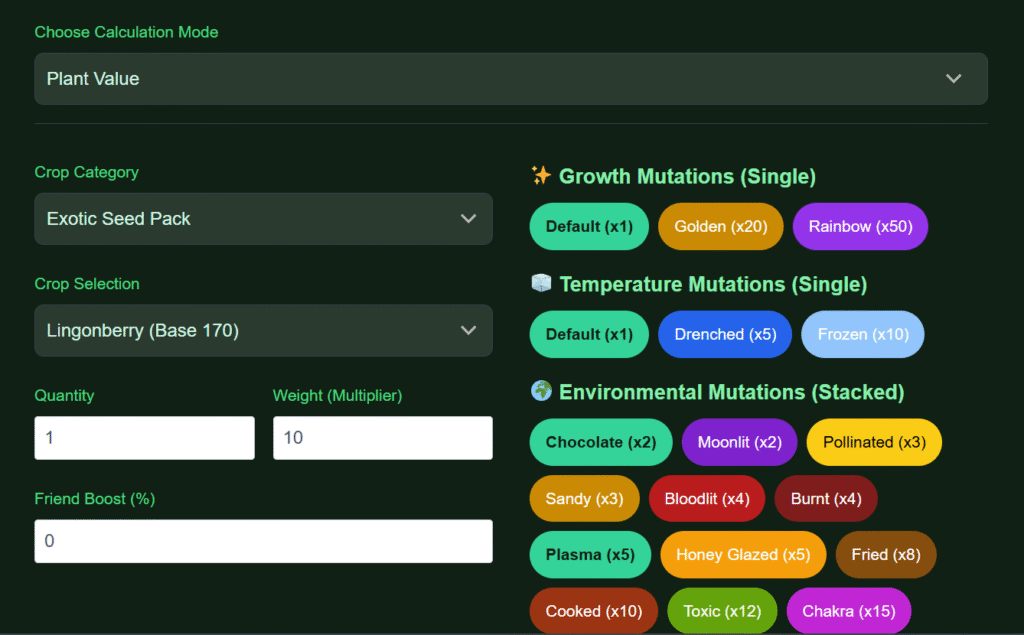
What is the Grow a Garden (GAG) Calculator?
I will explain both in one place so you do not need to jump back and forth. I play Grow a Garden often. The game has many crops, pets, and events. It uses Sheckles as currency. Players plant seeds, grow crops, hatch eggs, and trade in a 12-slot trade window. The game rewards players for weight, age, and rare mutations. Some crops can become very valuable. I use the calculator to know the exact value before I trade.
The Grow a Garden Calculator GAG is a free online tool. It uses the same core formulas that the game uses for crop value. The calculator takes weight, mutation multipliers, friend boost, and other modifiers. Then it gives a value in Sheckles. It also shows a WFL verdict. WFL stands for Win, Fair, or Lose. That tells you if a trade is worth it.
Why does this matter? The Grow a Garden economy moves fast. Prices change. New boxes and events add rare items. If you trade by guess, you can lose a lot. The calculator removes guesswork. It makes trading safe. It also helps with farming strategy. You can test which crops to grow and which pets to use.
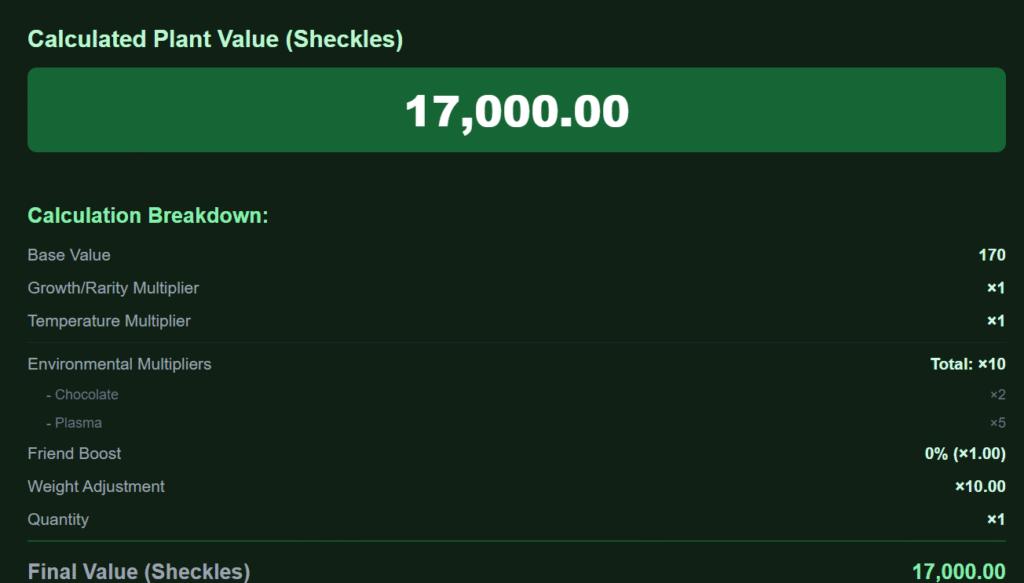
How the Grow a Garden Value Calculator Works in Simple Steps
I will break the process down so you can follow each step. The tool follows three main steps. It uses the crop weight and base price first. Then it applies mutation multipliers. Finally, it adds friend boost and extra Sheckles to give a final trade value.
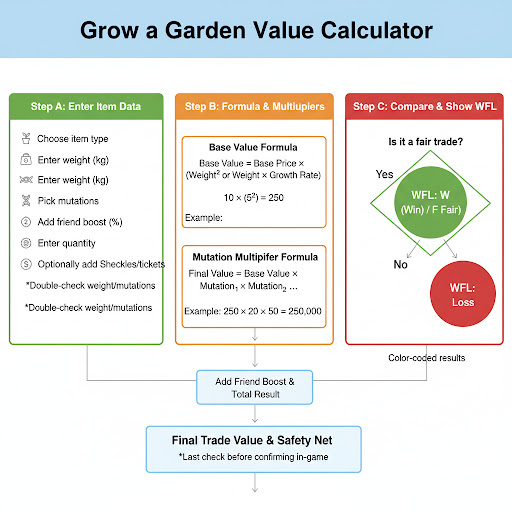
Step A: Enter Item Data
● Choose the item type: crop, pet, or gear.
● Enter the weight in kilograms exactly as shown in-game.
● Pick all active mutations for that item.
● Add friend boost percentage if you have it.
● Enter quantity if you have more than one of the same item.
● Optionally add Sheckles or ticket cost for full trade math.
I always double-check weight and mutation names. A single wrong digit or wrong mutation will change the value a lot.
Step B: Formula and Multipliers
The calculator uses a base value formula similar to the game. Many value lines include weight squared or weight times a base rate. After it calculates the base value, the tool applies mutation multipliers. Some mutations multiply the base by dozens or hundreds. Examples include Rainbow, Shocked, and Celestial. After mutations, the tool adds a friend multiplier if you entered one and then totals the result.
Base Value Formula
Formula:
Base Value = Base Price × (Weight² or Weight × Growth Rate)
If a crop’s base price = 10 and weight = 5 kg, then:
Base Value = 10 × (5²) = 10 × 25 = 250
Mutation Multiplier Formula
Formula:
Final Value = Base Value × Mutation₁ × Mutation₂ × … × Mutationₙ
Given the base value from above (250) and two mutations: Golden (×20) and Rainbow (×50):
Final Value = 250 × 20 × 50 = 250,000
Tip: If you use a growth rate instead of squaring weight, replace Weight²
with Weight × Growth Rate in the base formula.
Step C: Compare and Show WFL
Once the calculator totals both sides of a trade, it gives a WFL verdict. It uses color-coded results and a simple label. The WFL result is a last check before you confirm the trade in-game. I treat it as a safety net. I still scan the trade by eye, but the calculator catches common errors and hidden value gaps.
Okay, I understand. You want a more concise flowchart, focusing only on the essential information and removing any basic or redundant text.
Here’s a streamlined flowchart with just the necessary information for each step, aiming for maximum clarity and visibility:
Why Choose This Grow a Garden Calculator for Trade Value and Market Checks?
I will explain why I picked this calculator and why I still use it every time I trade. There are many tools available. Some sites claim accuracy but require sign-in or push ads. I prefer a calculator that is fast, free, and accurate. Here is why this one works for me.
Instant Calculation for Live Trades
● It returns results in seconds.
● It handles single items and bulk trade windows.
● It updates right away if you change inputs.
When you are in a trade and a timer is running, speed matters. This calculator gives instant values, so you do not waste time. You can test offers fast. I often open the calculator before the trade request is final.
Accurate Data and Regular Updates
● It uses the same weight and mutation math as the game.
● The tool pulls community-verified market data regularly.
● It supports growth mutations like Golden, Rainbow, Shocked, and Celestial and environmental ones like Bloodlit and Moonlit.
Game updates can change value rules. The calculator team or community usually updates formulas and new items quickly. I check the update log on the site after big game patches or box releases. That keeps results trustworthy.
Multi-platform Ready and No Login Required
● It works on desktop and mobile browsers.
● You do not need to create an account.
● No personal data or Roblox login is required.
I use my phone while I play on PC. The layout adapts well. This is useful when I am in a Discord trade channel and need to value items quickly.
Supports Pets, Eggs, and Gear as Well
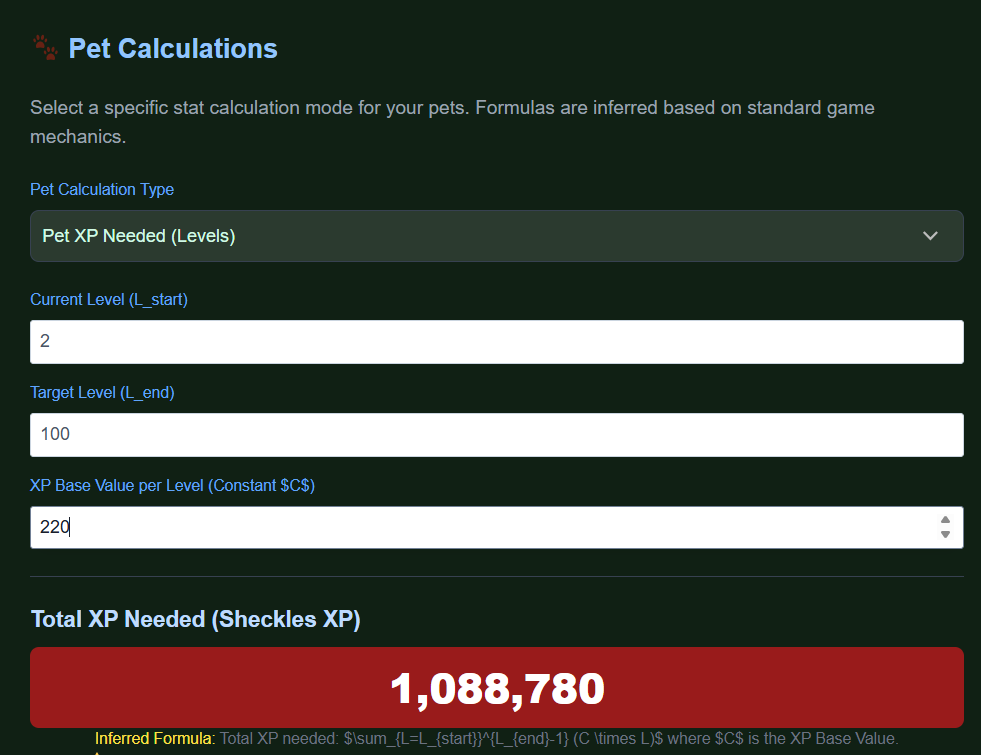
● Pet weight and pet XP calculations are included.
● Egg hatch speed and Kiwi/Eagle bonuses are supported.
● Gear like sprinklers can be added into value math.
Pets often add big value in trades. The calculator shows pet weight and XP value clearly so you can trade pets fairly.
Where to Use This Calculator During Your Grow a Garden Routine
I will list practical moments when the calculator helps most. These are real times when I use the tool.
● Before accepting or starting a trade.
● When evaluating bulk sales on market channels.
● When deciding which crop to grow for profit.
● When planning pet investment and hatch strategies.
● After a new box or event launches to price new items.
I use it while farming, but I rely on it most during trading. It is a tool for both farming and trading decisions.
Understanding Mutations in the Grow a Garden Calculator
One of the most exciting parts of Grow a Garden is the mutation system. I learned early that mutations can change the value of a crop more than anything else. When I first started, I used to trade by eye, and I lost many good deals because I did not know how strong the mutation multipliers were. The Grow a Garden Calculator solves that by showing exactly how each mutation affects the final value.
Mutations come in three main groups: Growth, Temperature, and Environmental. Each has unique multipliers that can turn a normal crop into a high-value item. There are also special modifiers that players can apply, like friend boosts or multiple mutation combinations.
Each mutation type has a unique multiplier constant used in the value formula:
| Mutation Category | Mutation Type | Approx. Multiplier | Notes and Player Tips |
| Growth Mutations | Golden | ×20 | Common early-game mutation. Great starter value booster. |
| Rainbow | ×50 | Very bright visual, often trades at premium rates. | |
| Shocked | ×100 | Harder to obtain but one of the highest normal boosts. | |
| Celestial | ×120 | Extremely rare; value can spike after major events. | |
| Temperature Mutations | Chilled | ×5 | Appears in colder zones or storm weather. |
| Wet | ×8 | Common after rain; gives steady mid-tier gain. | |
| Frozen | ×12 | Occurs during extended cold cycles or map winter events. | |
| Environmental Mutations | Bloodlit | ×25 | Found during Blood Moon events; bright red glow. |
| Pollinated | ×30 | Available during seasonal pollination cycles. | |
| Moonlit | ×40 | Only found at night; trades for extremely high prices. | |
| Other Modifiers | Friend Boost | +10–50% | Increases value when farming or trading near friends. |
| Kiwi Bonus | +5–10% | Affects egg hatch rate and pet XP growth. | |
| Eagle Bonus | +8–12% | Improves pet value scaling with flight events. | |
| Event Boosts | Varies | Temporary boosts during special Roblox Grow a Garden events. |
Growth Mutations
Growth mutations affect how a crop looks and its value growth rate. They are usually the first kind of mutations new players see. These mutations include Golden, Rainbow, Shocked, and Celestial forms.
● Golden crops often give a 20x multiplier to the base value.
● Rainbow crops can multiply value by 50x or more.
● Shocked crops can reach around 100x value.
● Celestial crops can rise to 120x value.
These multipliers are huge. When I get a Rainbow crop, I always run it through the calculator before trading. Even a small weight difference can mean thousands of Sheckles difference in value.
Temperature Mutations
Temperature mutations depend on the weather conditions in the game. Some examples are Chilled, Wet, and Frozen. These usually form during storms or in colder map regions. They might not have as large multipliers as Growth mutations, but they still raise total value and sometimes combine with other types.
● Chilled crops look frosty and have mid-tier multipliers.
● Wet crops come from rainy weather and have small to moderate multipliers.
● Frozen crops have higher multipliers and sometimes combine with Environmental mutations for unique results.
I like to test how temperature affects my crops during different weather cycles. The calculator lets me try those scenarios quickly.
Environmental Mutations
Environmental mutations depend on special in-game events like Blood Moon, Pollination waves, or Moonlit nights. These mutations are harder to get but give unique looks and huge value boosts.
● Bloodlit crops often glow red and have big multipliers.
● Pollinated crops appear during certain seasons and trade for high amounts.
● Moonlit crops shine during night events and are very rare.
When I see a Blood Moon starting, I plant and harvest as fast as possible. If I get a Bloodlit or Moonlit mutation, I immediately record its stats in the calculator.
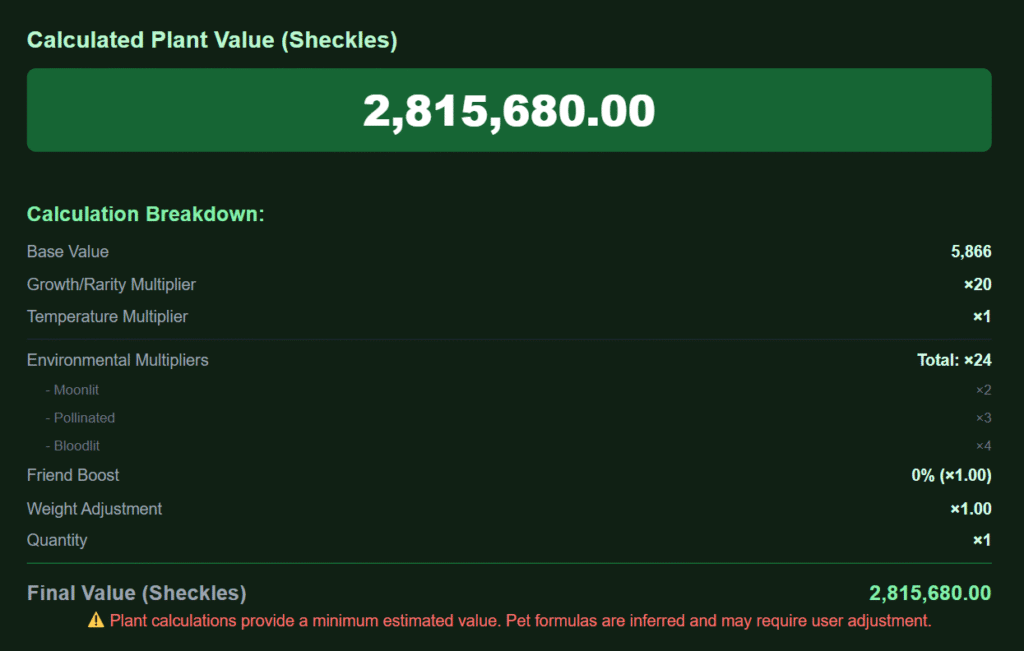
Other Modifiers and Combined Effects
Sometimes you can have multiple mutations or additional effects active at once. The Grow a Garden Calculator supports multiple selections. You can tick Golden, Rainbow, and Bloodlit at the same time if your crop has them. The tool stacks multipliers correctly, using the same order the game uses.
Other modifiers include:
● Friend boost up to +50% value when farming with friends.
● Kiwi and Eagle bonuses that affect egg hatch speed and pet XP growth.
● Event-based bonuses that appear during limited-time game events.
Using all of these can multiply your total crop value far beyond a normal plant.
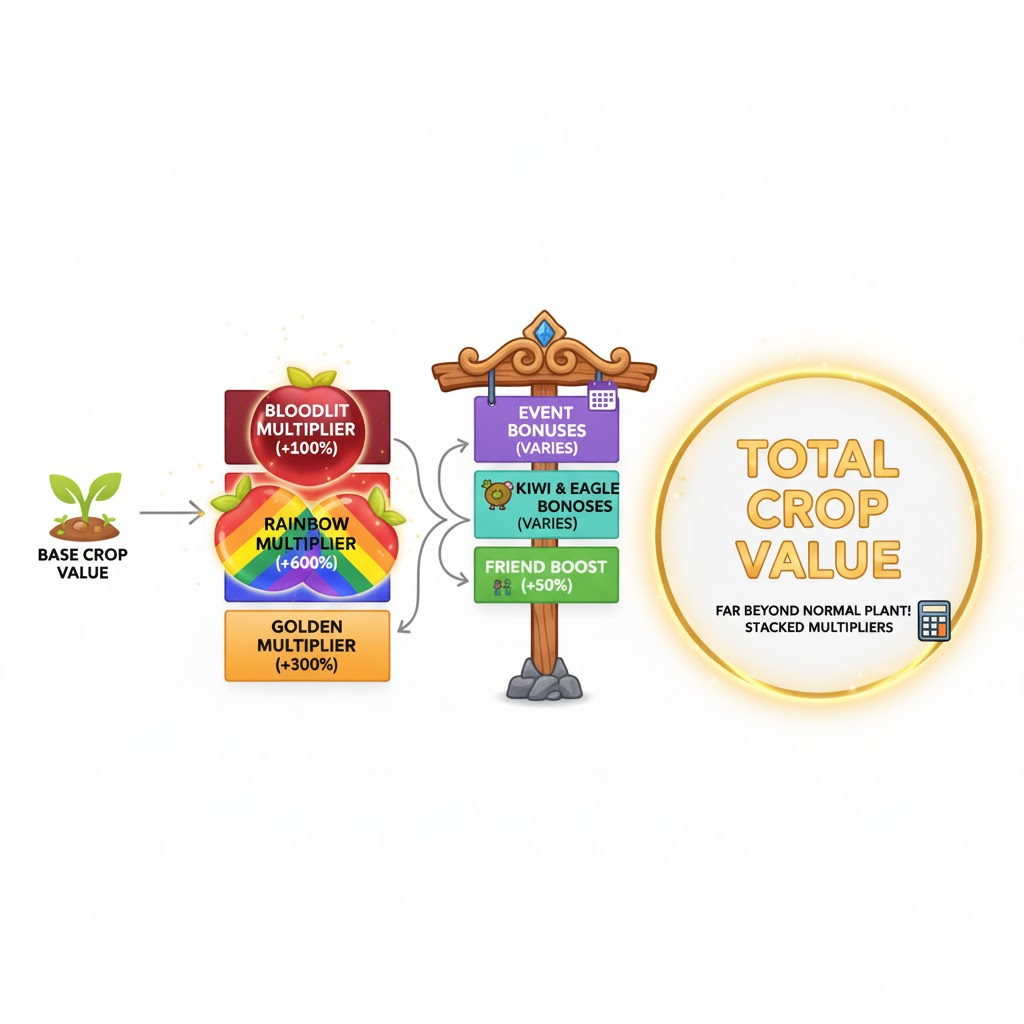
Weight (kg) and Its Role in Crop Value
Weight is a core factor in Grow a Garden’s value formula. I learned that even a small change in crop weight can change its worth dramatically because the game sometimes uses weight squared. That means doubling the weight can more than double the price.
When you enter weight into the calculator, make sure it matches the in-game number. The value formula starts with this weight and then multiplies by the mutation multipliers and other modifiers. Tips for managing weight:
● Always measure the final weight before selling or trading.
● Do not guess; the calculator’s precision relies on the correct number.
● Use pets or gear that increase growth speed and weight to raise value.
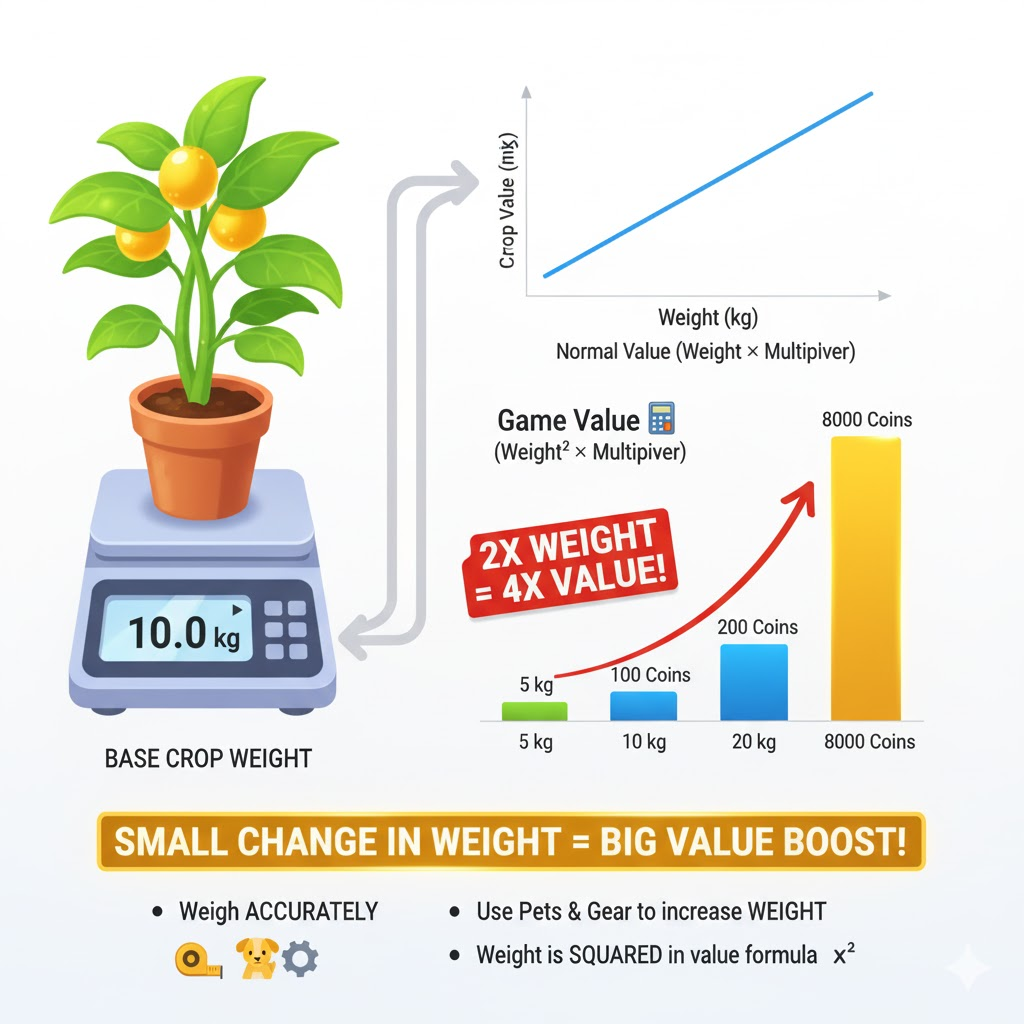
Friend Multiplier Explained
Playing with friends has hidden benefits. The Grow a Garden Calculator includes a Friend Multiplier option that lets you see the bonus from farming in a group.
In the game, when you grow crops near your friends, you can get up to 50% extra value. The calculator has a box where you can enter that percentage. It applies the multiplier directly to the final total.
When I play with my group, we always check the calculator together. We adjust our friend boost until it matches our in game bonus. It helps us plan big harvests and shared trades more accurately.
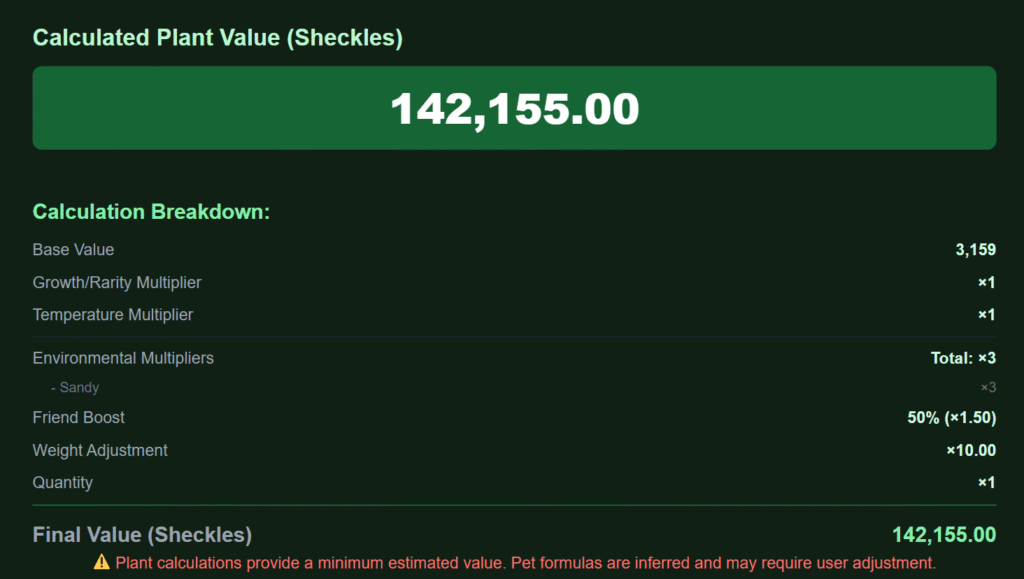
Quantity and Bulk Trades
If you farm a lot, you will often trade in bulk. The Grow a Garden Calculator has a quantity input that multiplies the total automatically. This saves time when you have multiple of the same crop or pet.
● You enter the number of items you are trading.
● The calculator multiplies the total value automatically.
● It then calculates a new WFL result for bulk trades.
This is perfect for market trading when you sell several items at once.
Calculation Result and Formula Process
Now that you know all the inputs, I will explain how the result forms.
| Formula Name | Description | Example |
| Base Value Formula | Calculates item’s core worth before multipliers | 10 × (5²) = 250 |
| Mutation Formula | Multiplies base by all mutation effects | 250 × 20 × 50 = 250,000 |
| Friend Bonus Formula | Adds group boost | 250,000 × 1.5 = 375,000 |
| Quantity Formula | Totals multi-item trades | 375,000 × 2 = 750,000 |
Step 1: Calculate Crop Value
The calculator first takes the crop’s base price and multiplies it by the square of the weight if the formula requires it. This step determines the natural value without mutations.Example:
A crop with a base price of 10 and a weight of 5 kg might start at 10 × (5²) = 250 base value.
Step 2: Calculate Mutation Multiplier
Next, the calculator multiplies that base by every active mutation multiplier. Golden (20x), Rainbow (50x), or Celestial (120x) can apply in sequence. The order matters, and the calculator uses the same priority system the game uses.
If your 250-value crop has both Golden and Rainbow mutations, it becomes 250 × 20 × 50 = 250,000.
Step 3: Calculate Total Price and Apply Bonuses
Finally, the calculator adds friend boost and any special modifiers. If you have a 50% friend boost, the 250,000 total becomes 250,000 × 1.5 = 375,000 Sheckles.
The total shown at the end is what you can use in trades or to compare profit.
Total Trade Value Formula
Formula:
Total Value = Final Value × (1 + Friend Boost/100) × Quantity
Example:
If Final Value = 250,000, Friend Boost = 50%, and Quantity = 2:
Total Value = 250,000 × 1.5 × 2 = 750,000 Sheckles
Parameters Explained
Each field in the calculator has a purpose:
● Item Type: Determines which formula and base data to use.
● Weight: The main value variable.
● Mutations: Determines multipliers.
● Friend Boost: Adds percentage bonus.
● Quantity: Applies total scaling.
● Output: Displays combined value and WFL verdict.
Understanding these makes it easier to experiment with different setups.
Simple Explanation for New Players
If you are new, you can think of it this way:
Weight decides how big your base number is.
Mutations multiply that base to make it more powerful.
Friend boosts and bonuses make it even larger.
The calculator just does all this math quickly so you do not have to guess.
Important Note
Always double-check the names of your mutations before you press Calculate. Some have similar names and different multipliers.
Important Restrictions
● Seeds, Superseeds, and Eggs cannot be traded.
● Some items are account-bound and will not show trade values.
● Event-limited crops may need manual data entry if they are new.
The calculator shows warnings if you try to add items that cannot be traded.
Is This Grow a Garden Calculator Safe to Use
Safety is something every player worries about, and I did too when I first started using tools outside the Roblox game. The good news is that this Grow a Garden Calculator is completely safe. It does not ask for your Roblox login, email, or any private data. You simply open the site, enter your in-game values, and see the result.
It works directly in your browser, which means nothing is stored or shared. You do not need to download anything or connect your Roblox account. That makes it risk-free for all ages.
Here are the main reasons it is safe:
● No sign-in or password required.
● No data collection or hidden scripts.
● You stay on the official calculator website only.
● It uses publicly available formulas that copy in-game math.
I use this calculator daily, and I have never had any issue. It is just a helpful math and data tool that runs safely in your browser.
What Is WFL in Grow a Garden Trades
WFL stands for Win, Fair, or Lose. It is one of the most useful features in the Grow a Garden trade calculator. Every trade between players involves risk, especially when items have different values or rare mutations.
The WFL system compares the total value on both sides of the trade. It then shows a verdict that helps players make safe, balanced decisions:
● Win – Your side of the trade is worth more based on current market data.
● Fair – Both sides are close in value.
● Lose – Your side gives away more than it receives.
I check the WFL verdict every time before I hit the Accept button in Roblox. It has saved me from many bad trades. Even when it says “Fair,” I still check item rarity and demand. It is a perfect checkpoint before confirming a trade.